
Station Cloud HelpHelp Center
PocketCloud
  • English
  • 简体中文
PocketCloud
Old Version
PocketCloud
  • Video Tutorial

  • Hardware Installation

    • M.2 SSD Installation - PocketCloud
    • M.2 SSD Installation - Dock
    • How to Connect PocketCloud to the Dock
    • Battery Installation
  • Quick Start

  • Remote Access

  • Photos

  • Cinema

  • File

  • File Service

  • Backup

  • Docker

  • Settings

  • Compatible List

  • FAQ

  • Contact Us
  1. PocketCloud
  2. /
  3. Hardware Installation

  4. /
  5. M.2 SSD Installation - Dock

¶ M.2 SSD Installation - Dock

You can install one M.2 NVMe 2280 SSD on your device.

¶ Operation Steps

  1. Ensure the Dock is disconnected from the power source.

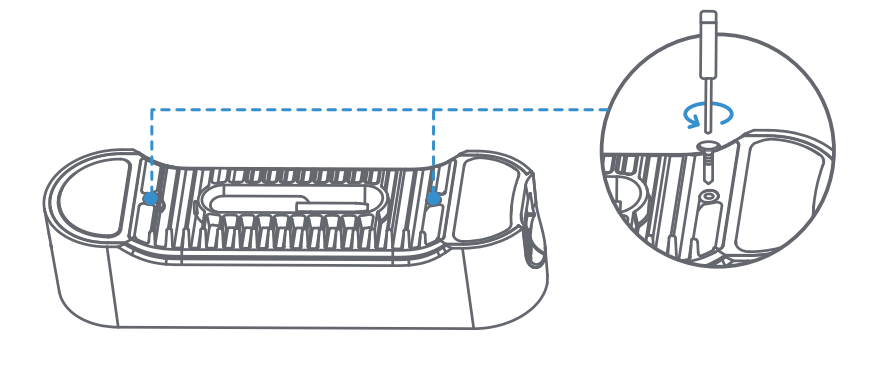
  2. Using the screwdriver loosen the screws and remove the bottom panel.
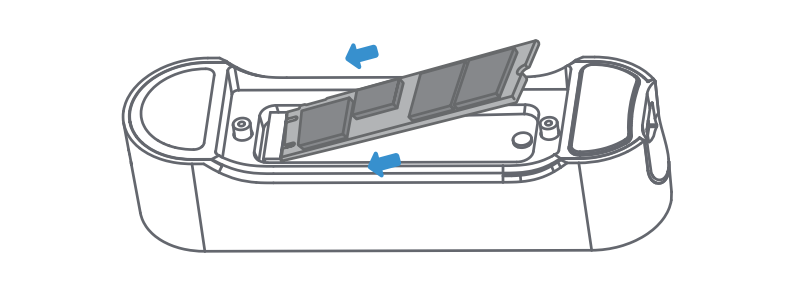
  1. Insert the SSD into the slot and tighten the screw.
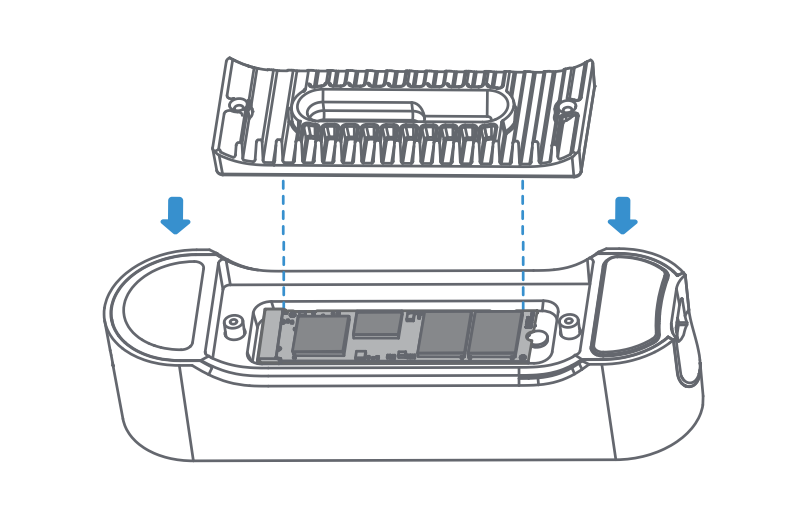
  1. Install the bottom panel back and tighten the screws.
Prev: M.2 SSD Installation - PocketCloud Next: How to Connect PocketCloud to the Dock
  • Operation Steps