
Station Cloud HelpHelp Center
PocketCloud
  • English
  • 简体中文
PocketCloud
Old Version
PocketCloud
  • Video Tutorial

  • Hardware Installation

    • M.2 SSD Installation - PocketCloud
    • M.2 SSD Installation - Dock
    • How to Connect PocketCloud to the Dock
    • Battery Installation
  • Quick Start

  • Remote Access

  • Photos

  • Cinema

  • File

  • File Service

  • Backup

  • Docker

  • Settings

  • Compatible List

  • FAQ

  • Contact Us
  1. PocketCloud
  2. /
  3. Hardware Installation

  4. /
  5. How to Connect PocketCloud to the Dock

¶ How to Connect PocketCloud to the Dock

After PocketCloud is connected to the Dock, the Dock can expand the following interfaces:

  • 2.5Gbps RJ45 Ethernet
  • USB 3.0 Type-A port
  • M.2 PCIe 2280 SSD port

¶ Operation Steps

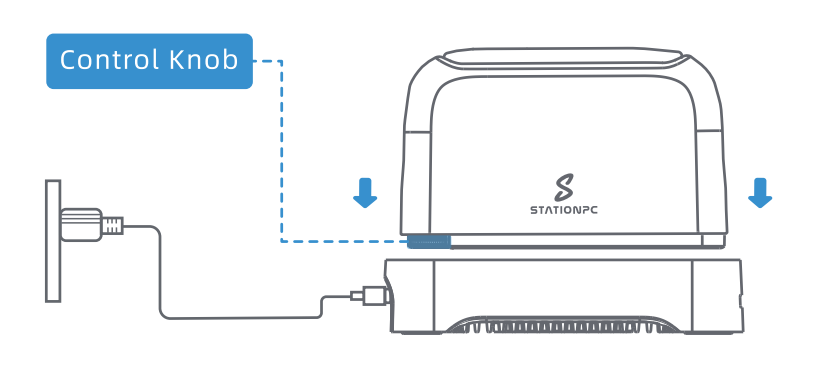
  1. Connect the Dock to the official PD power supply or other compatible PD power supplies.
  2. Plug the PocketCloud into the Dock in the direction shown in the diagram.
  3. Once successfully connected,the PocketCloud will emit a long "beep" sound, and it will connect to the Dock's power, wired network,and storage (if the Dock has these connected).
Prev: M.2 SSD Installation - Dock Next: Battery Installation
  • Operation Steps